
- Error
- Causes
- A Scheduled Incremental or Differential Runs Without a Full First
- The Full (Or Parent Incremental/Differential) Is Inaccessible While Using Alternative Locations
- The Backup Set Being Appended to Cannot Be Opened Due to Corruption
- The Full (Or Parent Incremental/Differential) Contains Non-Matching Partitions
- The Disk ID is Different from the Disk ID in the Full (Or Parent Incremental/Differential)
- There Are No Matching File and Folder Backup Sets in the Destination Folder
Error
There are a number of scenarios when creating a differential or incremental backup, whether interactively or scheduled, in which Macrium Reflect will not be able to create the specified differential or incremental backup and will instead produce a full backup. Not all of these scenarios constitute an error.
A message similar to the example below will be displayed in the HTML log file:
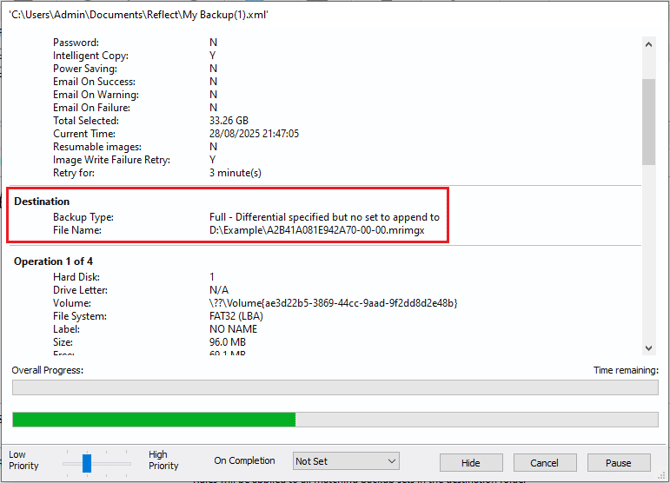
Below are explanations for when this message may occur.
Causes
A Scheduled Incremental or Differential Runs Without a Full First
To make configuring backup schedules easier, an incremental or differential backup can be specified without having to schedule a full backup first.
For example, to create an incrementals forever backup strategy, only the incremental backup would need to be specified:
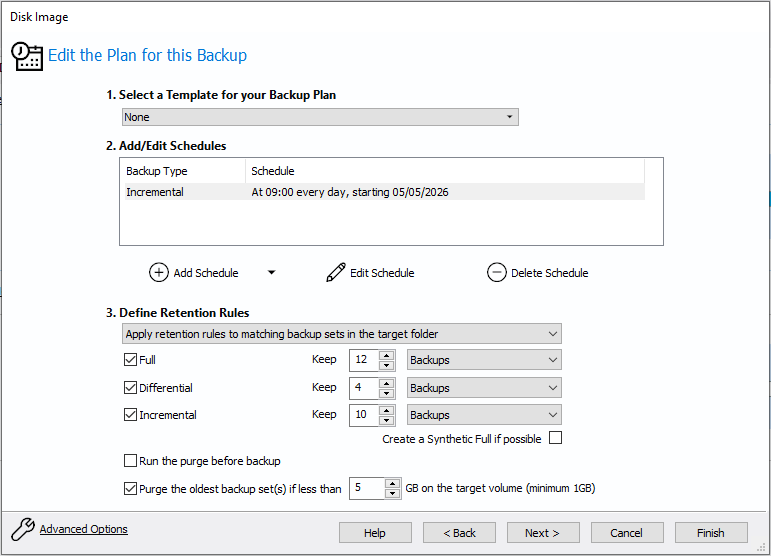
The first time that this scheduled incremental backup runs, a full backup will be created instead. Subsequent runs of the scheduled backup will create incremental backups that are appended to this full backup.
The Full (Or Parent Incremental/Differential) Is Inaccessible While Using Alternative Locations
When using the 'Alternative Locations' feature in Macrium Reflect, if a primary location can not be accessed, Macrium Reflect will instead write the backup to a secondary location. For example:
Primary location: \\mynas\backups\pc1\
Alternative location: D:\myusb\backups\pc1\
If an incremental is attempted to \\mynas\backups\pc1\, and that location is inaccessible due to a network outage, Reflect will instead attempt an incremental backup to D:\myusb\backups\pc1\. If a matching backup set is found on D:\myusb\backups\pc1\ then there is no problem, and Macrium Reflect will perform the incremental backup.
However, if there is no matching backup set on D:\myusb\backups\pc1\ yet, then Macrium Reflect will create a full backup and display the above message. Future incremental and differential backups to D:\myusb\backups\pc1\ when \\mynas\backups\pc1\ is inaccessible will create the specified incremental or differential.
This is expected behavior, and future backups to D:\myusb\backups\pc1\ will be created as the specified differential or incremental backup.
The Backup Set Being Appended to Cannot Be Opened Due to Corruption
If the existing backup files are corrupted in a way so that they are no longer recognisable as a backup set (corruption of the backup index), Macrium Reflect will be unable to append a new backup to the backup set, and instead create a new full backup.
To confirm that the backups are in fact corrupted, we recommend verifiying the files in the backup set as described here.
If the verification of the backup files fails, it is a strong indication of underlying hardware faults with the storage device where the backups are located, the controller that the storage device is connected to, or even the network when storing backups on network-attached storage. We recommend troubleshooting the components connecting the storage to the system to isolate the hardware fault.
The Full (Or Parent Incremental/Differential) Contains Non-Matching Partitions
When creating an incremental or differential image, Macrium Reflect will append the incremental or differential backup to the latest image in the destination folder that contains exactly the same partitions as the image that is being created. If Macrium Reflect is unable to find an image in the destination folder that contains exactly the same partitions, a full image is created instead, starting a new backup set.
For example, an incremental image is being created that contains the following partitions:

However, the only image in the destination contains the following partitions:

Macrium Reflect will not be able to append the incremental image to the image file in the destination, so a new full image is created instead.
The Disk ID is Different from the Disk ID in the Full (Or Parent Incremental/Differential)
Macrium Reflect uses the Disk ID (for MBR disks) and the Disk GUID (for GPT disks) to uniquely identify disks and ensure that the disk being imaged is the same disk as the disk contained in the backup set. These identifiers are generally stable and do not frequently changed. However, in some scenarios such as following a disk clone, these identifiers may change, resulting in the next incremental or differential image creating a full image instead.
There Are No Matching File and Folder Backup Sets in the Destination Folder
When creating an incremental or differential file and folder backup the backup target folder is scanned for backup sets that the new incremental or differential backup can be appended to. If none can be found then a new backup set is created by creating a Full backup.
There are three configurable options for how existing file and folder backup sets should be assessed for whether a new incremental or differential backup can be appended to it:
- Similar - Match on backups with at least one matching folder. Select this option to match if a backup set is found with at least one folder that is selected in the current backup. This option allows you to add and remove folders to your backup definition and still maintain a single backup set.
- Strict - Match on backups with exactly the same folders and filters. Select this option to match only existing backups that have exactly the same folder and include and exclude Filters. Retention rules will only be applied to exact matched backup sets.
- All - Match on any backup. Select this option to match on any existing file and folder backup set in the target folder. When selected, the most recent backup set will be appended to regardless of the folders in the set. Retention rules will be applied to all file and folder backups in the destination.
These options can be configured in the Macrium Reflect defaults and settings.