
- Overview
- What is Macrium Reflect LTSC
- Migrating to Macrium Reflect LTSC from Macrium Reflect 8.1
- Migrating to Macrium Reflect LTSC from Macrium Reflect 7 or Earlier
Overview
On February 27, 2026, Macrium Reflect 8.1 will become end of life, meaning that it will no longer receive new features, bug fixes, or security updates. As a result, to continue receiving updates, it is recommended that licenses be either upgraded to Macrium Reflect X or migrated to Macrium Reflect Long Term Servicing Channel (LTSC). This article describes what the LTSC license is, and the steps that can be taken to migrate to LTSC. For more information on upgrading to Macrium Reflect X, see this article.
To prioritize the long-term stability and reliability for critical SQL and Exchange infrastructure, Macrium Reflect Server Plus is transitioning to LTSC (Long-Term Servicing Channel) licensing only. This approach ensures that your infrastructure remains secure and dependable by providing 3 years of guaranteed security updates and critical bug fixes.
As a result, existing Macrium Reflect Server Plus licenses will not be available for upgrade to Macrium Reflect X annual plans. Macrium Reflect Server Plus licenses with active support and maintenance contract can migrate to Macrium Reflect LTSC Server Plus at no additional cost.
What is Macrium Reflect LTSC
Macrium Reflect LTSC is a stable version of Macrium Reflect, based on Macrium Reflect 8.1, designed to provide additional stability in environments where this is a key requirement. Macrium Reflect LTSC does this by providing critical security patches and bug fixes without feature updates that may introduce instability and changes to an otherwise stable environment.
Can I Migrate to Macrium Reflect LTSC?
The Macrium Reflect LTSC migration is available for any Macrium Reflect business standalone customer that has an active support and maintenance agreement, at no additional cost.
The existing support and maintenance agreement will remain in effect. This agreement must continue to be renewed to continue receiving the security patches and bug fixes available for Macrium Reflect LTSC users. If the renewal lapses, it cannot be renewed at a later date.
Migrating to Macrium Reflect LTSC from Macrium Reflect 8.1
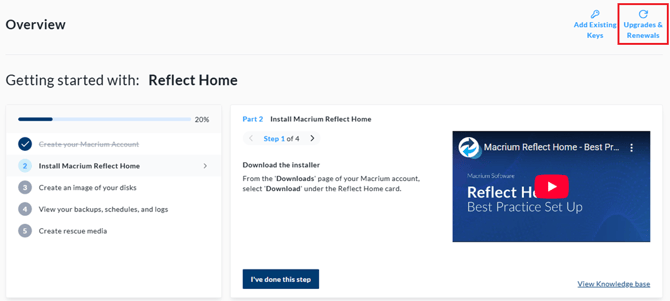
To migrate to Macrium Reflect LTSC, the existing Macrium Reflect licenses must be swapped to an LTSC license. To do this, log in to the Macrium Account here. In the Macrium Account, select the 'Upgrades & Renewals' button in the top right-hand corner of the page:
Next select 'Switch to Upgrades View' above the license table.
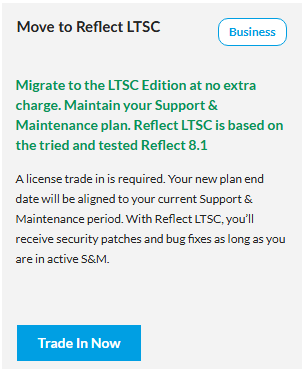
The window that opens will display the available upgrade and migration paths. A single license key may be eligible for multiple offers (e.g., 'Upgrade to Reflect X' or 'Move to Macrium Reflect LTSC'), and any additional license keys may also be eligible for additional offers. To migrate a Macrium Reflect 8 or below license key to a Macrium Reflect LTSC license, select 'Trade In Now' under 'Move to Reflect LTSC' offer:
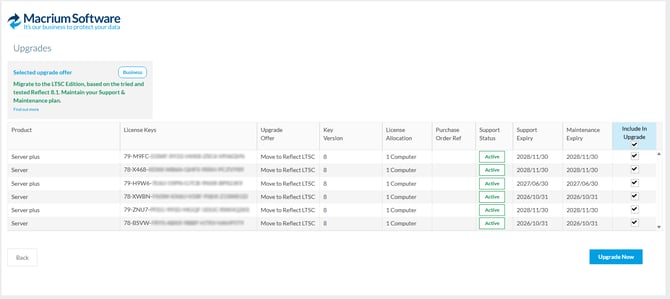
In the table that opens, select the licenses that will be migrated to LTSC using the checkbox on the right-hand side of the table, then select 'Upgrade Now':
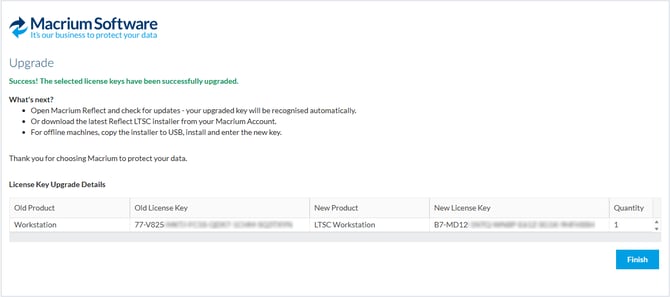
Once the license migration has been completed, a success screen will be displayed. On this page, the old license key and the corresponding Macrium Reflect LTSC license will be displayed:
Once the license key swap has been performed, launch the current installation of Macrium Reflect 8.1, select the 'Help' menu, then select 'Check for Updates...'. The latest version of Macrium Reflect LTSC will be displayed in the 'Macrium Reflect Updater':
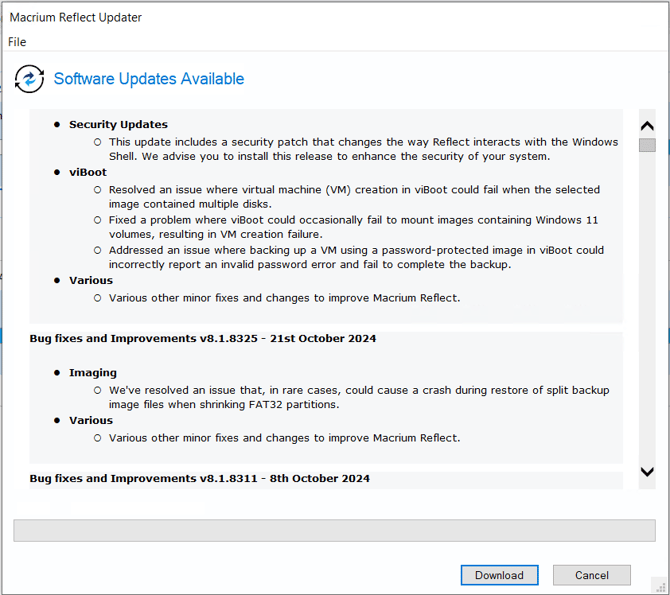
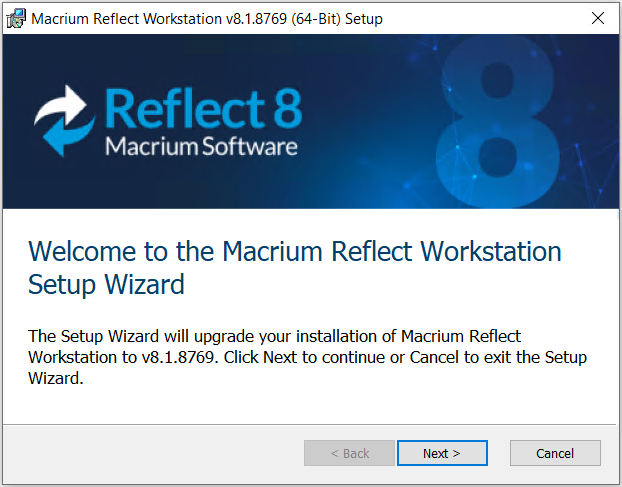
After selecting 'Download' the installer for Macrium Reflect LTSC will launch:
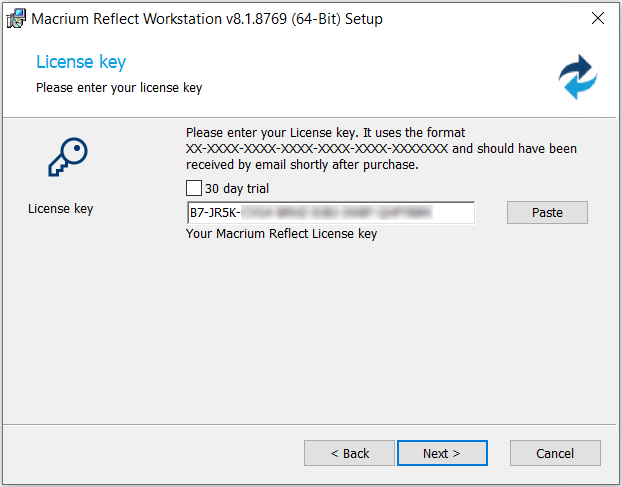
During the installer, the new Macrium Reflect LTSC license key will be displayed:
For more information on this installer wizard, please see this article.
When updating an offline installation of Macrium Reflect 8 to Macrium Reflect LTSC, the installer should be downloaded from the Macrium Account and then run over the existing installation as described in this article. As part of this, all existing settings and options will be retained.
If a version of Macrium Reflect LTSC has been released that is higher than the currently installed version of Macrium Reflect 8.1, an update notification will be displayed. If no notification is displayed, the current version of Macrium Reflect 8.1 is the latest and a notification will be displayed when the next update for Macrium Reflect LTSC is released.
Migrating to Macrium Reflect LTSC from Macrium Reflect 7 or Earlier
To migrate to Macrium Reflect LTSC, the existing Macrium Reflect licenses must be swapped to an LTSC license. To do this, log in to the Macrium Account here. In the Macrium Account, select the 'Upgrades & Renewals' button in the top right-hand corner of the page:
Next, select 'Switch to Upgrades View' above the license table.
The window that opens will display the available upgrade and migration paths. A single license key may be eligible for multiple offers (e.g., 'Upgrade to Reflect X' or 'Move to Macrium Reflect LTSC'), and any additional license keys may also be eligible for additional offers. To migrate a Macrium Reflect 8 or below license key to a Macrium Reflect LTSC license, select 'Trade In Now' under 'Move to Reflect LTSC' offer:
In the table that opens, select the licenses that will be migrated to LTSC using the checkbox on the right-hand side of the table, then select 'Upgrade Now':
Once the license migration has been completed, a success screen will be displayed. On this page, the old license key and the corresponding Macrium Reflect LTSC license will be displayed:
Once the license migration has been performed, take note of the license key and navigate to the Macrium Account 'Downloads' page. On this page, a new option will be available to 'Download LTSC':
-png.png?width=393&height=369&name=image%20(13)-png.png)
When the installer has been downloaded, run the installer over the existing Macrium Reflect 8.1 installation. More information about using the Macrium Reflect LTSC installer can be found here. All settings will be retained during the update to Macrium Reflect LTSC.